
HVAC software for small business · QuickBooks Online · 1–20 techs
HVAC software for QuickBooks Online
from rooftop to invoice.
HVAC scheduling, dispatch and work orders that sync with QuickBooks Online in real time. Drag the no-cool call onto the calendar, your tech runs it from the phone with the unit's full service history, and the finished job lands in QuickBooks as an itemized invoice the same day.
Repair-CRM is HVAC software compatible with QuickBooks Online, built for small businesses with 1–20 technicians. It runs in the browser on Mac or Windows, with a mobile HVAC app for iPhone and Android. It adds the four things a small HVAC company needs on top of QuickBooks: a drag-and-drop dispatch calendar with GPS map, a mobile app with per-unit service history (every AC unit, furnace and rooftop unit keeps its own repair timeline), offline work orders with photos and signatures, and one-click QuickBooks Online invoices with parts and labor itemized. Customers and products sync two-way, so nothing is typed twice. $19–$179/month flat, rated 4.9/5 on Capterra, listed on the Intuit QuickBooks App Store.
Last updated: October 2026 · Describes the current shipping product · real screenshots of one HVAC job below.
2.5-minute demo
Watch one HVAC call go from the first phone call to a QuickBooks Online invoice
- Scheduling & dispatchBook the call into an open slot and assign the technician.
- On-site documentationPhotos, parts, labor and the customer's signature from the phone.
- Invoicing in QuickBooks OnlineThe office reviews the job and creates the invoice in one click.
No credit card · QuickBooks Online sync included on every plan
Prefer to jump to a step? Watch the HVAC + QuickBooks demo with chapters →
QuickBooks Online compatibility
HVAC software compatible with QuickBooks Online: here's exactly what syncs
If your books live in QuickBooks Online, HVAC software should feed them, not fight them. Repair-CRM connects to your QBO company in a few minutes, pulls in your customers and your parts & services list, and from then on every finalized HVAC job (refrigerant, condenser fan motor, labor hours) becomes an itemized QuickBooks Online invoice with one click.
- Two-way customer sync: a customer created on the job site in the field app shows up in QuickBooks Online; a customer added in QBO is instantly schedulable.
- Two-way products & services sync: your QuickBooks Online items become the parts catalog your techs pick from on the phone.
- One-click invoices: the finalized work order (parts, labor, notes) becomes a QuickBooks Online invoice, matched to the right customer and items.
- Per-unit service history stays in Repair-CRM and links back to the QBO invoice, so you can trace any charge back to the exact unit and visit.
Need the field-by-field detail? See how the QuickBooks Online sync works →
Compatibility at a glance
| Item | Direction | Supported |
|---|---|---|
| QuickBooks Online (all plans) | Real-time sync | ✓ Yes |
| Customers | Two-way | ✓ Yes |
| Products & services (parts catalog) | Two-way | ✓ Yes |
| Invoices from finalized jobs | Repair-CRM → QBO | ✓ One click |
| QuickBooks Desktop (Pro / Premier / Enterprise) | — | ✗ Not supported |
On QuickBooks Desktop? Our comparison of QuickBooks field service software lists the tools that do connect to Desktop.
Real job, real invoice
One no-cool call, start to finish, in Repair-CRM and QuickBooks Online
Real screenshots of one residential call (demo company: ClearAir HVAC). Each step is one screen your dispatcher, your tech or your office touches — and nothing is re-typed into QuickBooks.
The call comes in — and the unit's history speaks up
Mike Turner, already a QuickBooks Online customer, calls: AC running but not cooling, “he had this issue earlier.” The dispatcher books it against his Carrier 24ACC6 condenser and assigns Jake. Before anyone drives out, Service History Insight reads the unit's past work orders: in June the same capacitor tested weak and the customer declined the replacement. Suggestion: bring a 45/5 µF dual run capacitor and check the contactor.
Per-unit service history · AI insight (beta)
On site, the tech documents the work on the phone
WO/001875 on Jake's phone: the asset and where it sits, the reported problem, a checklist (capacitor & contactor, refrigerant charge, amp draw) and what was done — failed run capacitor replaced, pitted contactor replaced, amp draw and superheat verified. Parts and labour come from a price book that syncs from QuickBooks products & services. No signal on the roof? It all works offline.
Photos · checklist · parts · time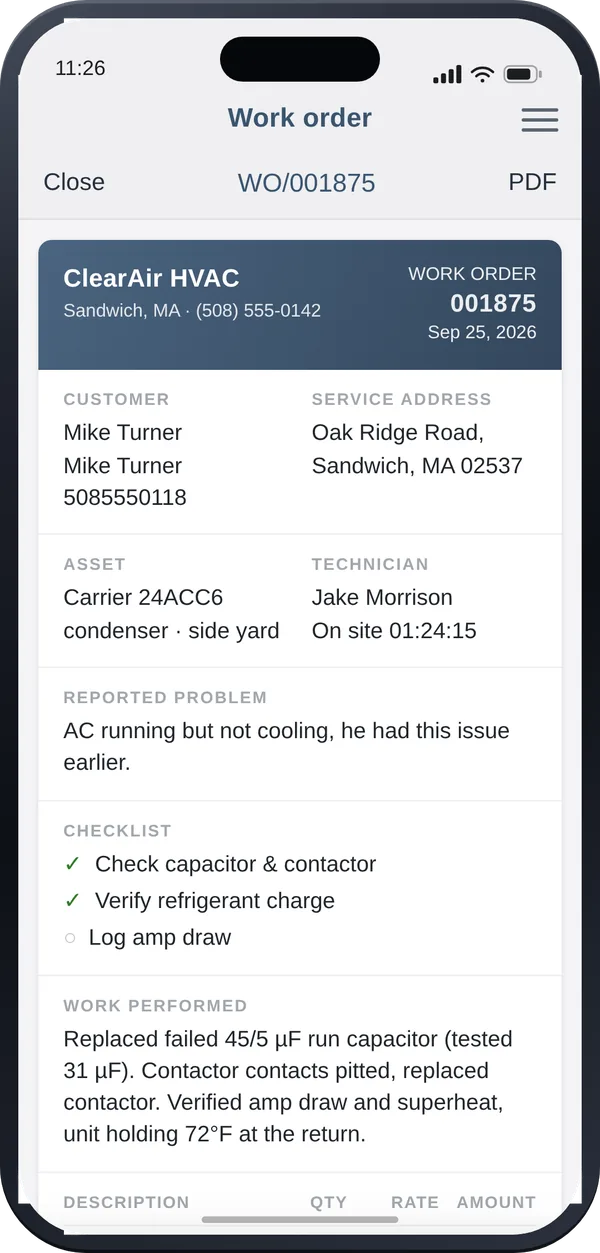

The office finalizes — then one click to QuickBooks
Signed at 11:26, 1 h 24 min on site. The job enters Finalizing, where the office checks the lines against the tech's notes — every replaced part billed, labour at 1.5 h — before anything reaches the books. Then Create Invoice in QuickBooks: invoice date, terms, the QBO billing address and the work order number in the memo.
Office review → QuickBooks
Invoice 6465 in QuickBooks Online, same day
The itemized invoice lands in QuickBooks Online against the right customer: diagnostic $129, run capacitor $185, contactor $95 and 1.5 h labour $217.50 — $626.50, with Work Order: WO/001875 in the note to customer. Your bookkeeper never opens the paperwork.
One click → QBO invoice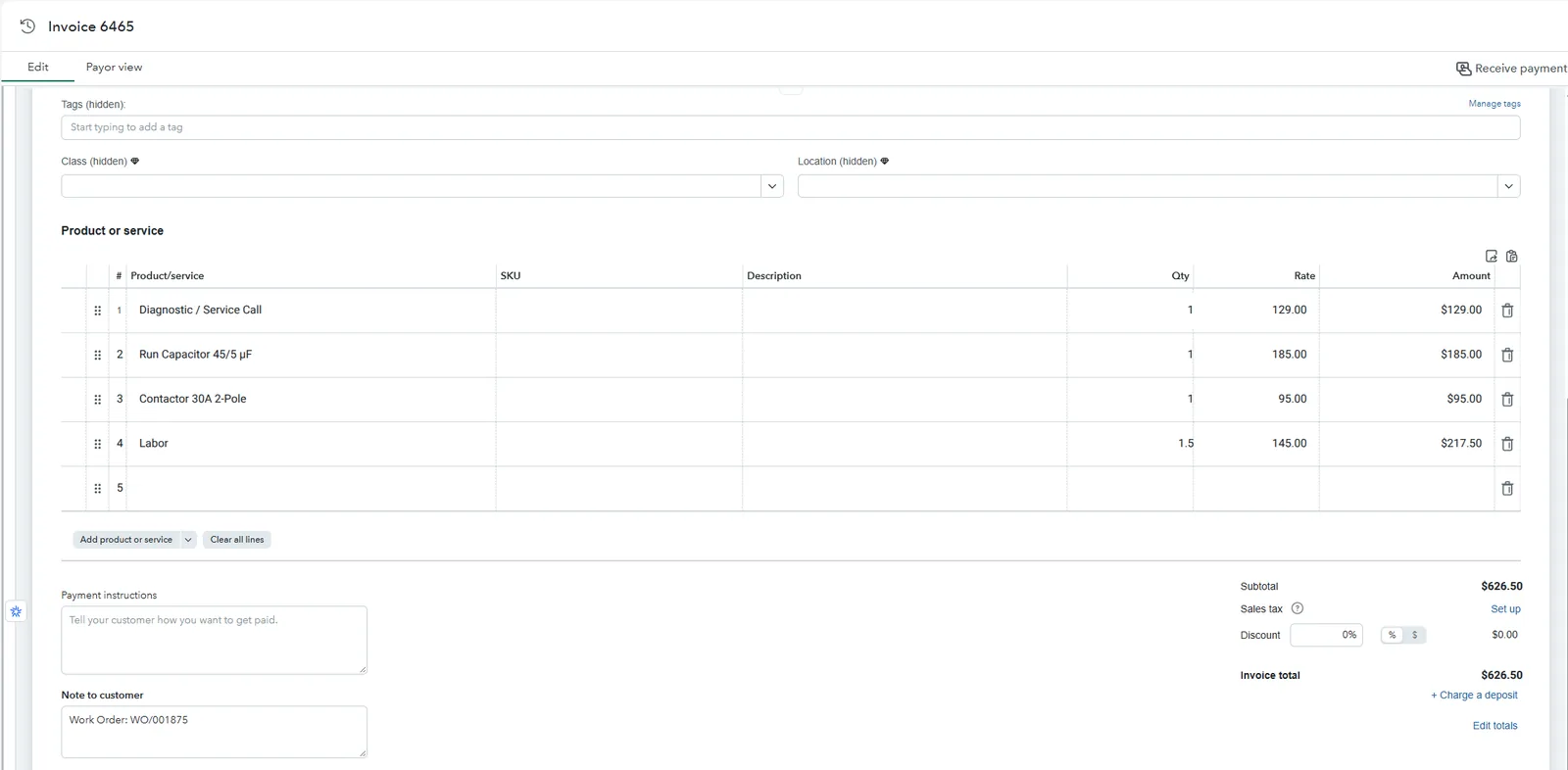
Want the long version with the why behind each step? Read our guide to HVAC software that integrates with QuickBooks →
Customer story
“QB transfer instant and accurate” — a service business owner on the QuickBooks sync
Cody runs a small service company in Colorado. He had already tried several CRMs and dispatch tools before Repair-CRM. This is his review, unedited except for one phrase naming his trade.
After trying several CRMs/dispatch services… this was the one that actually worked as described. Dispatch is instant, QB transfer instant and accurate… You will actually get a real human in the USA that won't stop till your questions are answered and/or your issues are resolved. True story… they have even re-coded some of the functionality to suit our business need. Laszlo is my ‘go to’ for help and never misses. I'm a Repair-CRM lifer!
Several CRM and dispatch tools tried, none of them worked the way they were described.
Connected QuickBooks Online and dispatched real jobs. Dispatch reached the techs' phones immediately; finalized jobs landed in QuickBooks as invoices without re-typing or corrections.
Support from a real person in the US, and part of the product re-coded for his workflow. Setup help from a real person is included on every plan; small shops don't get a ticket queue.
HVAC scheduling software · the whole job in one flow
HVAC scheduling that ends in a QuickBooks Online invoice
The whole product in 14 seconds: the office drags the no-cool call onto the dispatch calendar, the tech runs it from the phone with photos and a signature, and the finished job becomes a QuickBooks Online invoice. Nobody types anything twice.
Green Lemon Restaurant
Rooftop unit not cooling
Condenser fan motor + 1h labor
Comparing schedulers first? We put five QuickBooks job scheduling tools side by side — including when a competitor is the better pick.
Built for the trade
What HVAC companies get out of the box
Per-unit service history
Every AC unit, furnace and RTU has its own timeline: what failed, which parts went in, photos from last season. Your tech sees it before touching the unit — fewer repeat diagnostics, higher first-time fix rate.
Maintenance agreements & seasonal scheduling
HVAC service agreements become recurring jobs that generate themselves. Spring tune-ups and fall check-ups land on the calendar without anyone remembering them, each visit is logged against the unit, and overdue visits flag themselves red.
Mobile HVAC app, offline-ready
Basements and rooftops don't have great signal. The mobile app for technicians (iPhone & Android) works fully offline — photos, notes, signatures — and syncs the moment your tech is back in coverage.
An HVAC CRM built around the equipment
Customer, sites, contacts, every AC unit and furnace with its own history, every job and every invoice — one record, synced with your QuickBooks Online customers. The CRM part of HVAC software, without a separate sales tool to keep in sync.
Your QuickBooks price book on every phone
QBO products & services become the tech's parts list: capacitors, contactors, refrigerant by the pound, labour by the hour. Every line lands on the right income account. How other tools handle this: QuickBooks work order software, compared.
Also run plumbing or electrical?
Same system, same QuickBooks sync, trade-specific price books and checklists. See plumbing software that syncs with QuickBooks Online and electrical contractor software.
Coming from paper + QuickBooks?
Most HVAC shops that switch to Repair-CRM were running QuickBooks Online plus a clipboard, a whiteboard or a spreadsheet. Setup is usually one afternoon:
- Connect QuickBooks Online: customers and your parts list import automatically, no CSV wrangling.
- Invite your techs to the mobile app (iOS / Android). No training project.
- Dispatch one real call and watch it come back as a QBO invoice. Setup help from a real person is included on every plan.
When we're not the right pick
- You run QuickBooks Desktop. Our sync is QuickBooks Online only — see the alternatives in our honest comparison.
- You run 20+ trucks. We build for small HVAC shops; large fleets need fleet-scale tooling.
- You want built-in flat-rate pricebooks and financing. That's Housecall Pro territory — we keep the product simple.
FAQ
HVAC software & QuickBooks: common questions
Is Repair-CRM HVAC software compatible with QuickBooks?
Which QuickBooks versions does the HVAC software work with?
Does the HVAC scheduling sync with QuickBooks?
What does HVAC software do for a small business?
Is Repair-CRM a CRM for HVAC businesses?
How does per-unit service history help HVAC techs?
Does the HVAC software work on Mac?
Is there a mobile HVAC app for technicians?
How much does HVAC software for QuickBooks cost?
Connect QuickBooks Online and run your next no-cool call in Repair-CRM
Connect your QBO company, dispatch one real call, and watch it come back documented and invoiced. If it doesn't feel simpler by Friday, you've lost nothing.
Start 14-Day Free Trial → See pricingNo credit card · 4.9/5 on Capterra · QuickBooks App Store listed · From $19/month
Keep exploring: